Last Updated on April 20, 2020
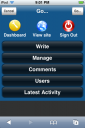 This will interest you, provided you gather two conditions:
- you’ ve got an iPhone
- you run at least a selfhosted WordPress blog
If you do, then think how nice it would be to be able to communicate directly from your iPhone with your WordPress install via a customized interface, easier to use from a mobile phone.
Well, now you can do it, with the help of WPhone admin plugin for WordPress, which offers you the following:
- an iPhone / iPod Touch specific interface with full Javascript and animation support
- a lightweight, simple version designed for all other phone types (no Javascript or anything else required)
The WPhone plugin is fast, and although it is built on a native Apple handheld application, it will look good on any mobile platform. The plugin’s XHTML compatibility even ensures that mobile browsers which don’t support CSS will receive a plain interface for managing WordPress blogs.
If you are curious how it looks like, check out these screenshots of the original iPhone version and of the lite variant for other mobile phones.